Maximum FPS and crisp image: best BloxStrike settings
These Are the Best BloxStrike Settings
Want the best BloxStrike settings for smoother gameplay, higher fps, and better aim? This guide covers the settings that give you the biggest competitive advantage without making the game look terrible. Here's the fastest way to set up your game like RadiasRoblox and FireCat do.
Best Video Settings
Your graphics settings can make a huge difference. Higher FPS means smoother gameplay and faster reactions.
Recommended Settings:
- Global Shadows – Off
- Glass Shatter – Off
- First Person Tracers – On
- Muzzle Flash – Off
- Ragdolls – Off
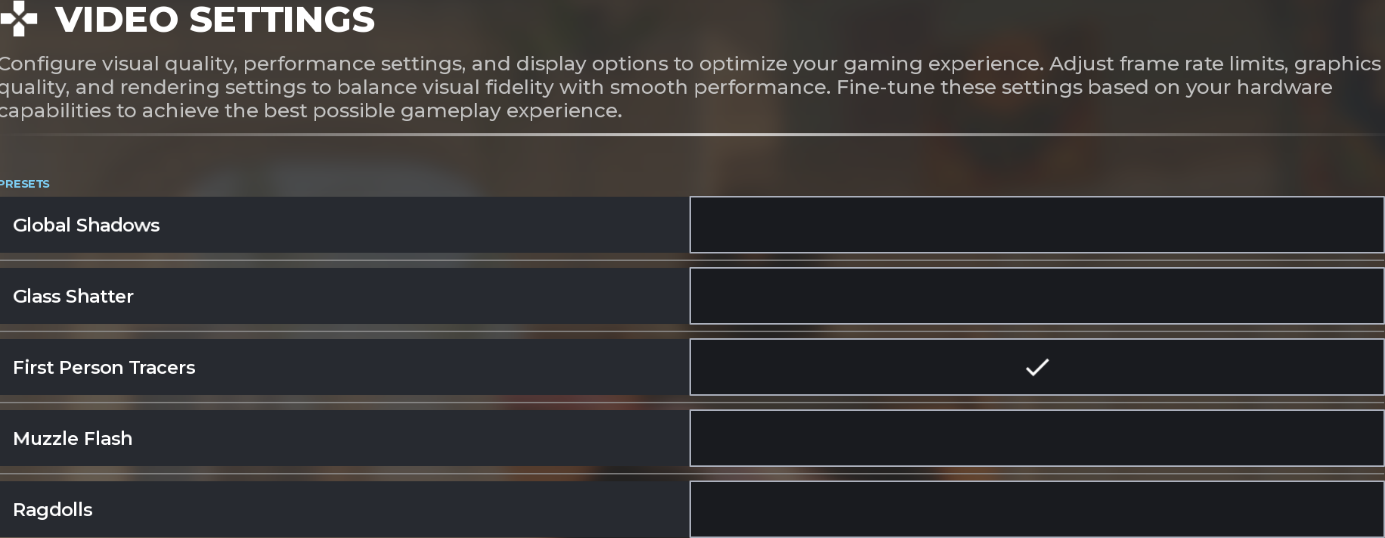
Turning off shadows, glass, muzzle flash, and ragdolls removes visual clutter. Enemies pop out faster, and your FPS gets a nice boost too. Keep tracers on so you can see where your bullets go and adjust if you're missing shots.
Item Settings
- Auto Re-Zoom Sniper Rifle after Shot – On
- Detach Silencer on M4A1-S and USP-S – Off
- Always Show Inventory – On
- Auto Pickup Dropped Weapons – On
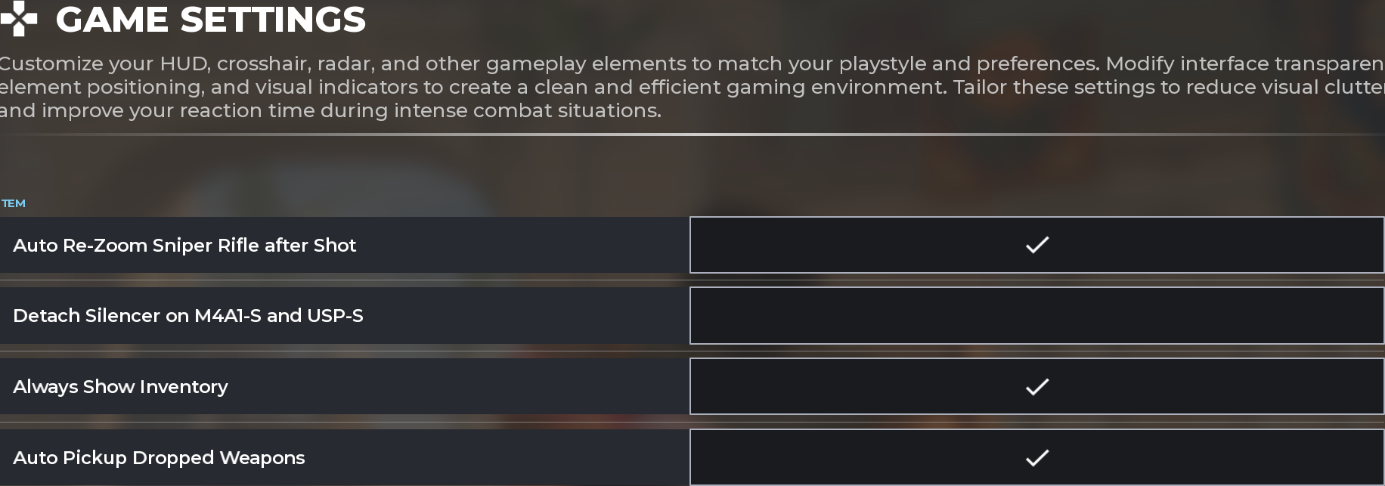
These settings help you play faster and avoid costly mistakes. Auto Re-Zoom gets you back on target quicker for follow-up sniper shots. Turning off Detach Silencer stops you from accidentally misclicking it off mid-fight. Always Show Inventory keeps your equipment visible, so you always know what you're carrying. And Auto Pickup Dropped Weapons saves you time by grabbing weapons off the ground for you after a fight.
Best Crosshair Settings
There's no single "best" crosshair. It comes down to feel. But most pro players use a setup like this:
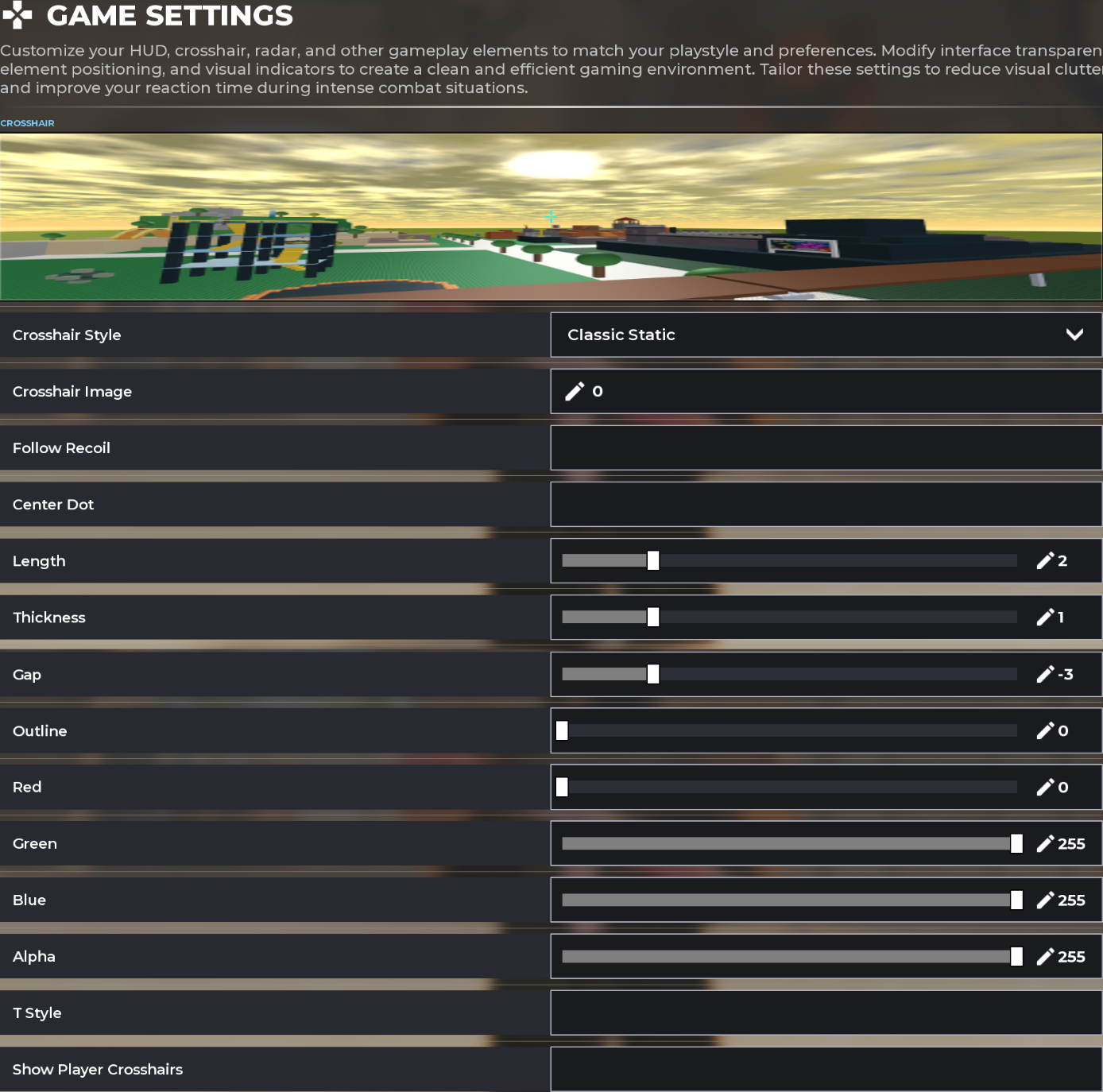
Viewmodel Settings
This viewmodel setting works well because it doesn't cover up your entire screen, so you can see everything clearly, including your skins.
- X Offset – 3
- Y Offset – -1.5
- Z Offset – -1.5

Best Sensitivity Settings
Sensitivity is a crucial part of BloxStrike. You need to find your own sweet spot. There isn't a single "perfect" sensitivity for everyone.
But pro players usually land between 0.05-0.2 camera sensitivity inside Roblox's Settings, with a DPI between 400-800.
For example:
RadiasRoblox uses a camera sensitivity of 0.078 and a DPI of 400.

If your aim feels shaky, lower your sensitivity. If you're too slow to turn, raise it slightly. Give any change a few rounds before deciding it's "wrong."
Final Thoughts
There isn't one magical setting that instantly makes you better. The best BloxStrike settings are the ones that give you smooth FPS and help you play consistently.
Once you find settings that feel comfortable, avoid changing them every match. Consistency builds better aim, better movement, and better results.
Good luck, and enjoy your games!